

How to connect GA4 to BigQuery for free, why you should do it the moment you create a property, and how to use the data in Looker Studio (now Data Studio).
Update, 2026: Google has renamed Looker Studio back to Data Studio (Google Cloud announced it in April 2026). Where this post says Data Studio or Looker Studio, it is the same tool, and we have left the wording as we wrote it at the time.
It's free! It's finally free. So back in the day, if you wanted to link Google Analytics to BigQuery you'd have had to pay, and we mean pay a lot because you would have needed a 360 account, and they don't come cheap. Luckily for us, with the arrival of Google Analytics 4 you can now link your GA4 account to BigQuery for free, well basically free. The option is free, like it's there in your settings on the free tier of GA, but technically BigQuery is paid for, but only technically. So yeah, you pay for BigQuery, which in reality means your credit card only comes out once you go over the free tier, which includes 1 TiB of queries a month and 10 GiB of storage, which for the average site is a lot, like a lot a lot. So you know, just do it, you most likely won't get charged and if you think that you're gonna be querying a lot, just set a warning in the billing settings so Google will pop you an email when you're gonna go over budget.
Anyhow, you may ask, why should we care. Well it's a big deal, you can run all kinds of queries on your data, slice and dice it, combine it with other data sources and whatnot, but most importantly you want to do this for a few reasons the moment you set up your account.
Reason 1, well you're most likely gonna end up building dashboards in Google Data Studio, and while GA 4 is great, it's fresh out the box and just doesn't do everything you might want it to do in Data Studio, so what you'll most likely end up doing is having 2 data sources for that pretty report of yours. One that's just your vanilla GA4 data source and one that's pulling your GA4 data from BigQuery. That should have your bases covered, especially if you're gonna be visualising a lot of stuff around events in GA, the BigQuery data source is great for that.
Reason 2, and this is the main reason you should be doing this, in our experience no earlier data is added to BigQuery retrospectively once you link, so if you decide you do actually need it 3 months down the line it is not there, so if you want all your data in BigQuery right from the start, link it up immediately.
Reason 3, and this is a big one, and we're just gonna add it here because it really matters. Google has in all their wisdom stuck an API limit on the connector for Google Analytics 4 in what is now called Google Looker Studio. Yes, since GA4 arrived, the Google Analytics 4 connector in Looker Studio comes with limits. Now you might say they're not that bad, but they absolutely are as the limits not only apply to usage, so let's say you used 1 token at the arcade to display a graph on the pinball machine, but now your mate John, who is actually your client, Corporation X, logs into the same pinball machine / dashboard in Looker Studio, whoops, usage just doubled, you're out of tokens and the graph stops working. Which is a real crap way of explaining, that every usage limit you just stayed under while you were building a dashboard goes up with every user that goes and looks at said dashboard, or for that matter when anyone else uses the connector, like Susan in marketing who has her own dashboard.
I've said it a few times in our posts, Milk Moon Studio is a design focussed Webflow Studio, we don't want to query anything in SQL in BigQuery, we're Webflow designers, but we want to give our client clean, useful and hopefully free dashboards in what is now Looker Studio, sadly this is no longer a reality with the heavy constraints placed on the GA4 connector, but, as a designer who does not want to get a hand dirty, you can put in a bit of effort, dump the data and BigQuery and build the exact same thing using the BigQuery connector, which does not have that GA4 token limit (BigQuery's own free tier and costs still apply), and is in our experience faster than the GA4 way anyway. I urge you, avoid the limitations, put in a bit of sweat the first time and just do it via BigQuery.
One final thought: in February 2023 the Google Search Console team announced bulk data export to BigQuery, so add your GA data, because you can now mash it up with Search Console!!!
But before we get started, you may be asking, what exactly is BigQuery, well:
BigQuery is a fully-managed, serverless data warehouse that enables scalable analysis over petabytes of data. It is a Platform as a Service that supports querying using ANSI SQL. It also has built-in machine learning capabilities.
So what does that mean and why do I care? It's a big data warehouse you can use on the cheap, that'll allow you to run a lot of really simple, or really complicated queries really quickly. But guys, you might say, I don't need that, to which we'd say, it also connects directly to Data Studio allowing you to visualise your data in a super simple way, no harder than connecting a spreadsheet.
Anyhow, if you're still on the fence, just take the leap, it ain't gonna cost you and you'll have the data down the line if you end up needing it.
What are you going to need to do this?
1 GA4 property (don't have one? Follow this post)
A Google Cloud account (Get one here)
Admin rights so they actually link properly (Google says you need Editor or above on the GA4 property, and Owner on the Google Cloud project)
Step 1: Create a Google API project
- Log in to the APIs Console.
- Create a new API Project.
- Open the Nav Menu top left, click APIs and Services and then click Library.
- Under Google Cloud APIs, click BigQuery API and then Enable.
- If you're new here do the terms and conditions bit.
- Open the Nav again and head to billing, you don't want the free sandbox and your data will eventually be deleted.
- Set up a billing account.
- Go to BigQuery.
- Create a new dataset, if this works your billing is set up.
- Now you're going to need a service account (this is the bit about the permission).
- Add analytics-processing-dev@system.gserviceaccount.com as a member of the project, and ensure that permission at the project level is set to Editor (as opposed to BigQuery Data Editor). Editor permission is required in order to export data from Analytics to BigQuery. (Update: Google's current docs say the link now sets up its own service identity with the BigQuery User role when you create it, so in our experience you may find this step is already done for you. If your link works without it, you can skip this step.)
Step 2: Link GA4 to BigQuery
Go to your GA settings and click on BigQuery Linking
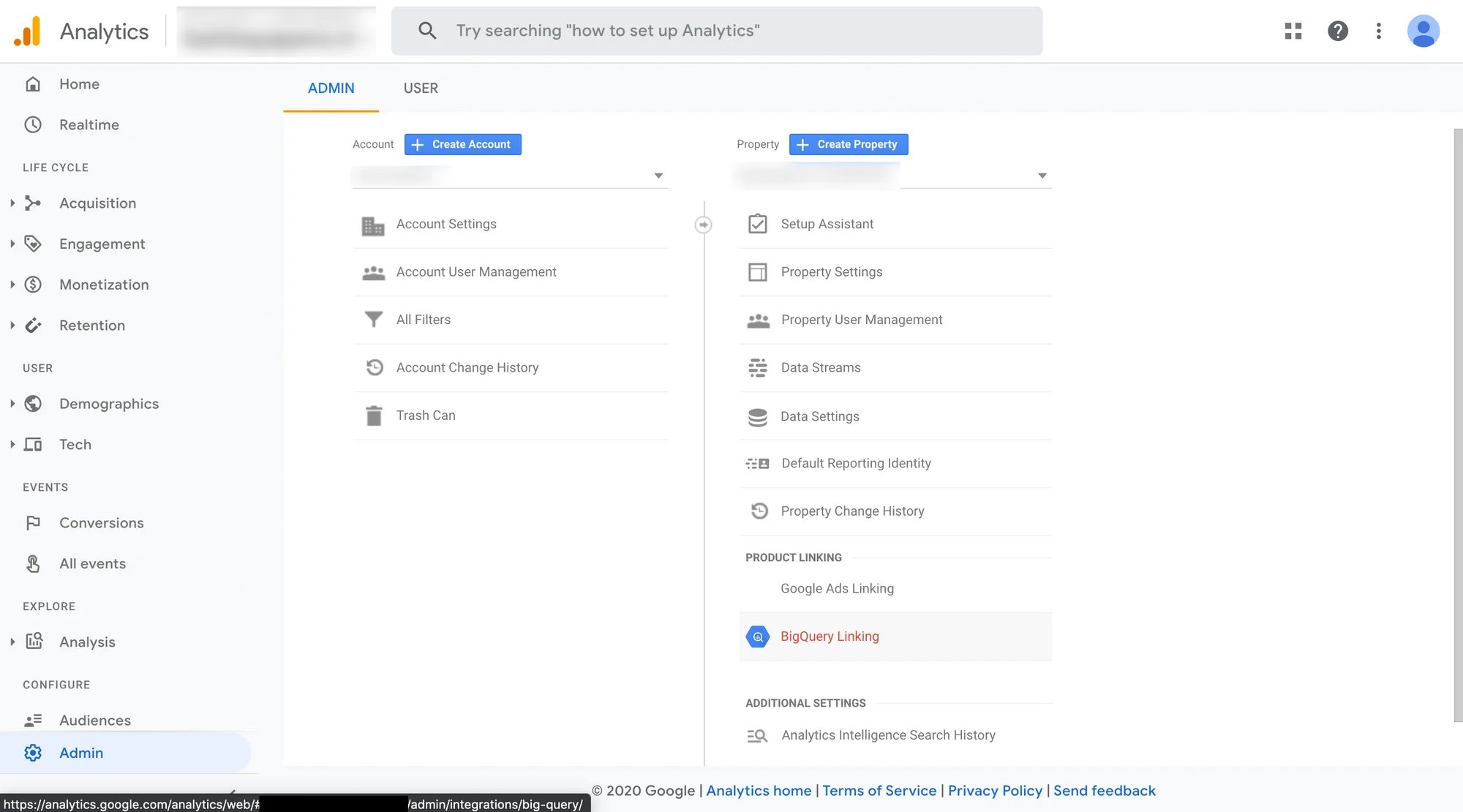
Click Link to create the link.
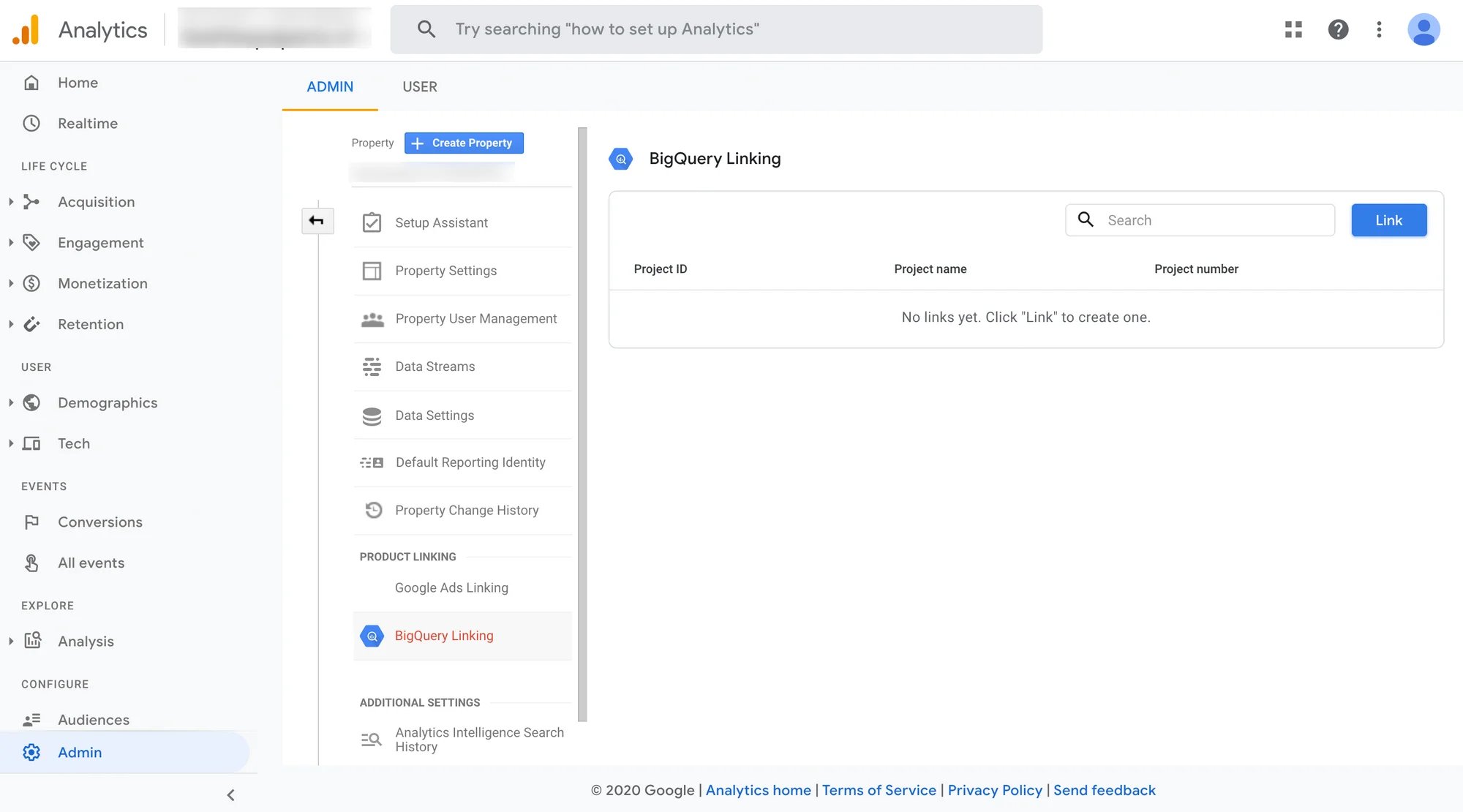
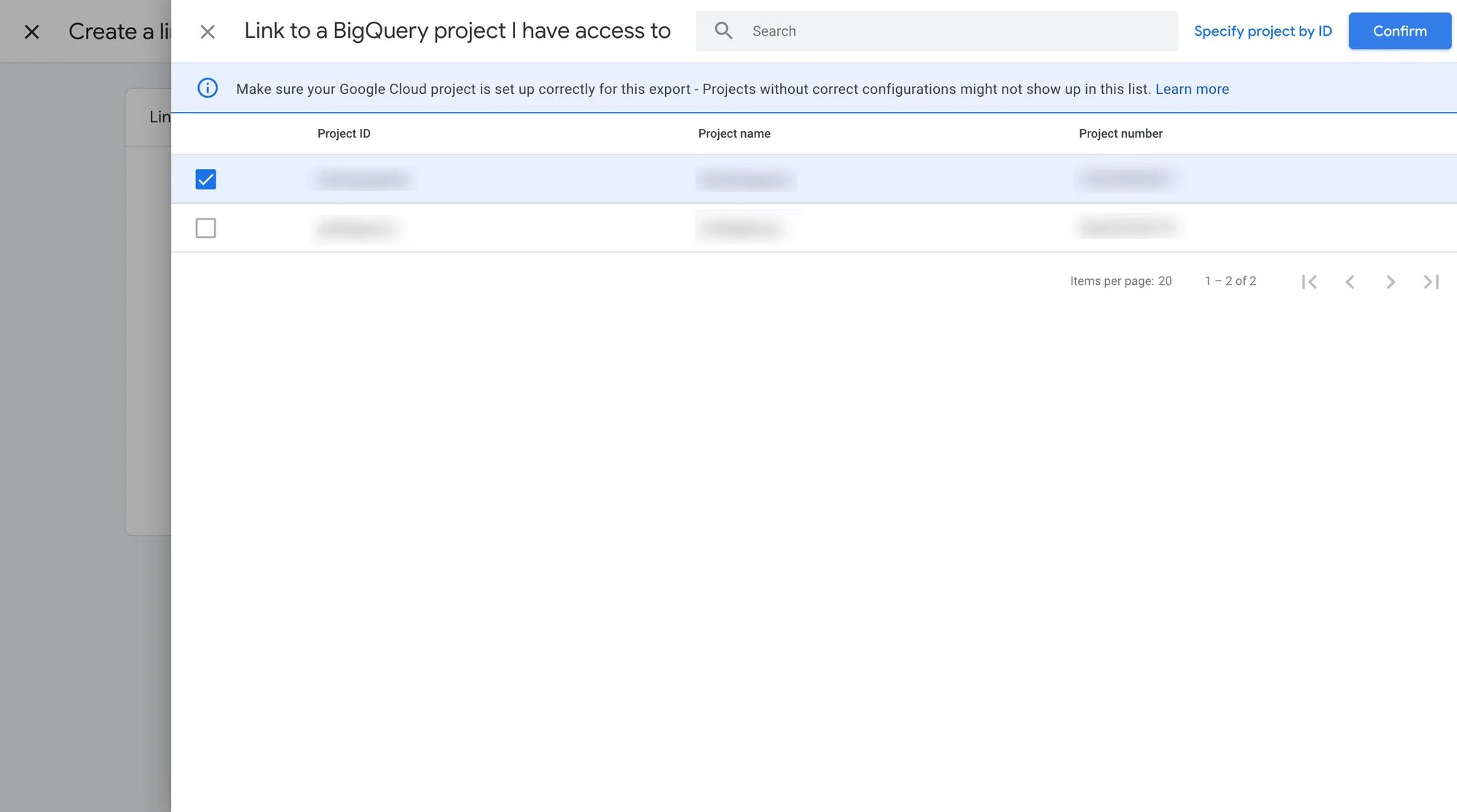
Click Choose BigQuery Project
Select the project you just created.
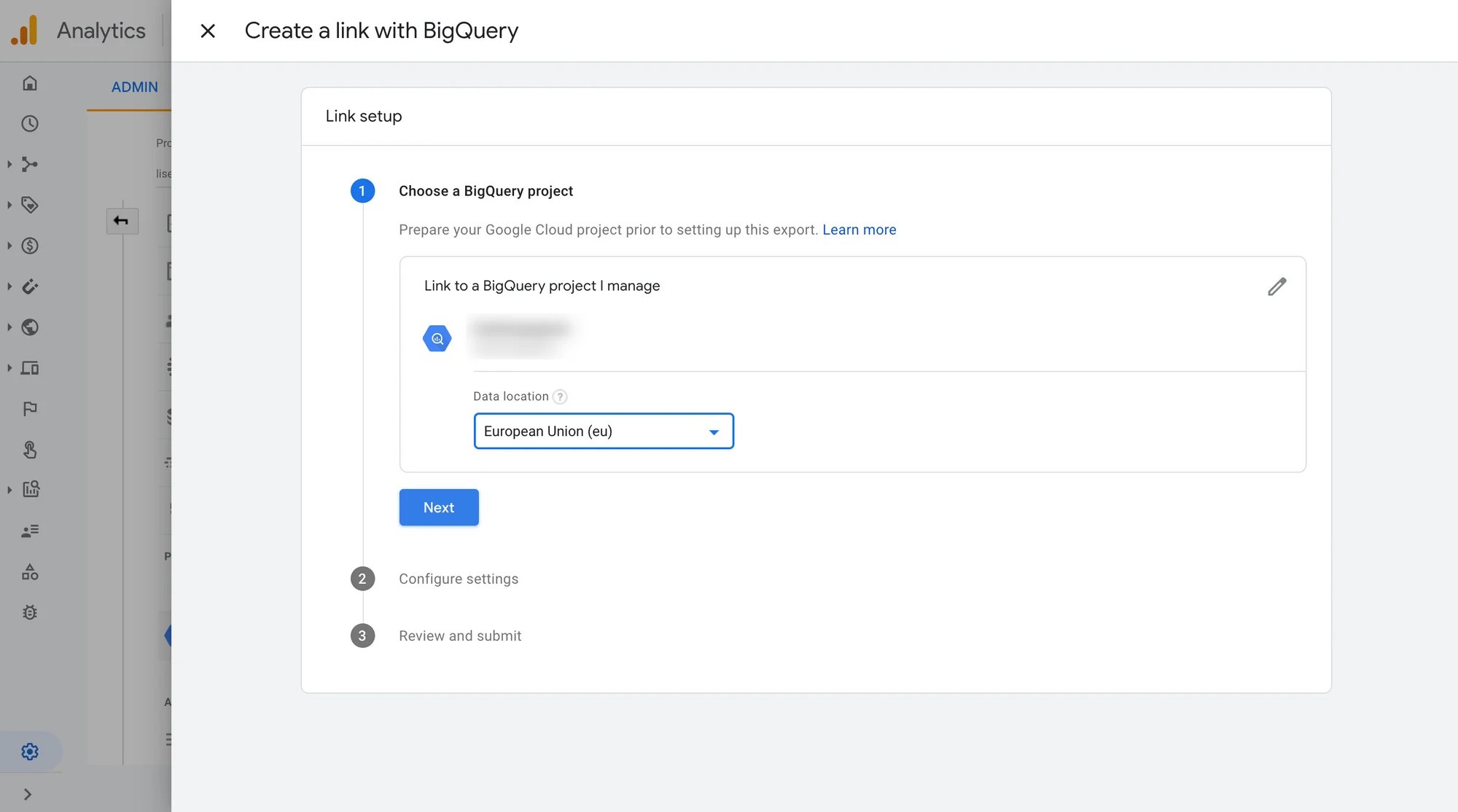
Now select the region to run queries, if there are any GDPR implications to what you're doing you're gonna want to go with the EU (and if you're wondering how much of your data you keep once consent is in play, have a look at what happens to your data when 97% of visitors decline cookies).
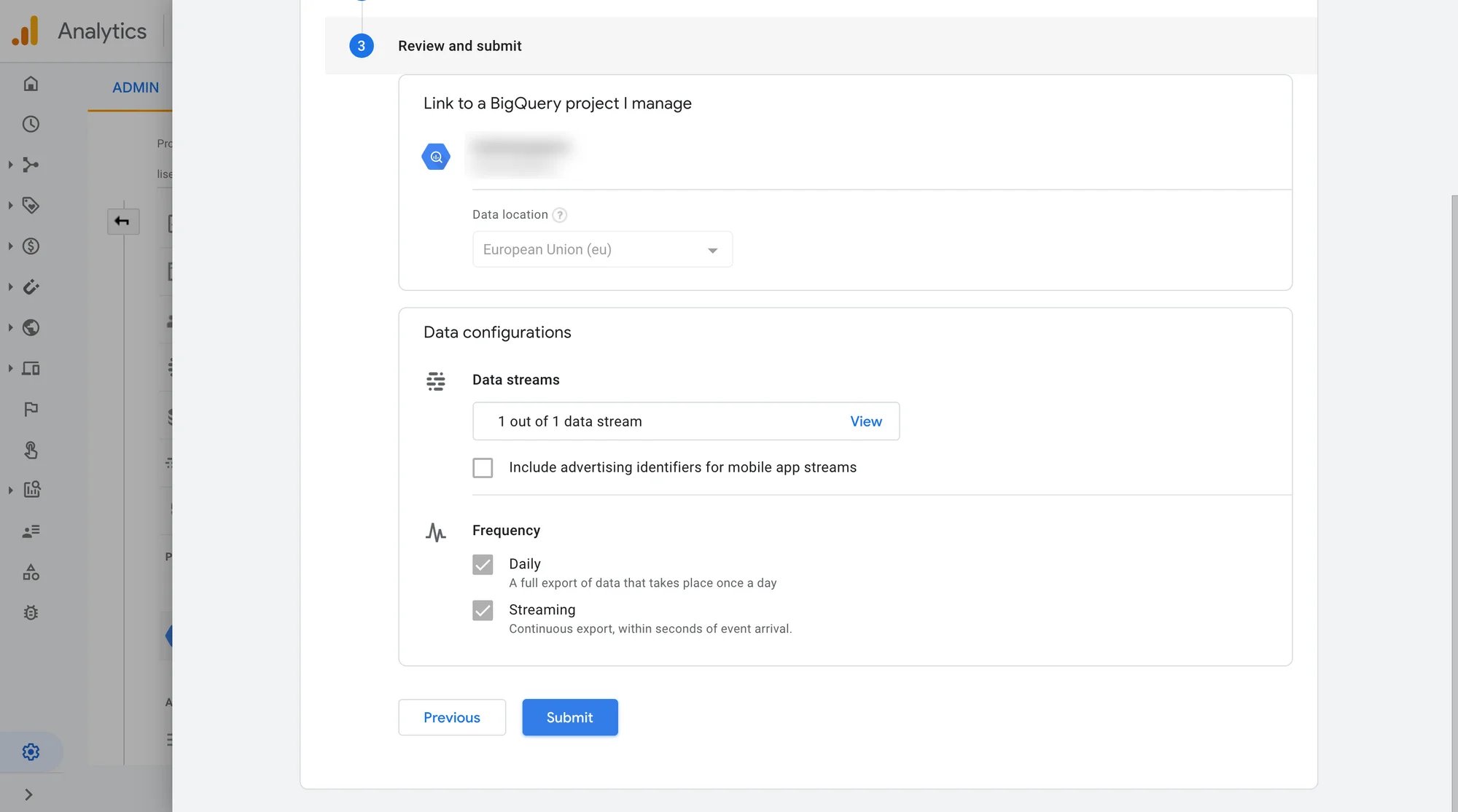
Now you're going to select your datastream and the frequency, we usually don't bother with streaming, once a day should be just fine for most things. All this means is that you'll always have the data from the day before as the latest data in BigQuery. Streaming is the one that costs extra (Google charges $0.05 per gigabyte for it), and standard GA4 properties have a daily export limit of 1 million events, which is worth knowing about if your site is busy.
Click submit and you're done.
Sometime in the next day your data will start appearing in BigQuery (Google says within 24 hours). So, wait a day, head to Data Studio, create a new data source, select BigQuery and your GA dataset will be there. We'll do a few posts on Google Analytics datasets in Google Data Studio at some point. In the meantime, remember that you now have GA data in an easy to use Data Warehouse, you can move data to other cloud platforms like Azure or AWS, you can use other tools like Tableau and PowerBI to visualise your data, all because it's nice, tidy, and safe in BigQuery. Enjoy and if you have anything to add or ask hit us up in the comments.
Questions people ask about connecting GA4 to BigQuery
Is the GA4 to BigQuery link really free? The link itself is free on standard Google Analytics 4 properties. BigQuery has a free tier of 1 TiB of queries and 10 GiB of storage a month, so most small sites never see a bill. Do set up billing though: sandbox tables expire after 60 days, and streaming export costs $0.05 per gigabyte, while the daily export does not.
Will GA4 send my old data to BigQuery when I link it? In our experience no. Google says data starts flowing within 24 hours of linking, so link the moment you create the property, otherwise the earlier days are not in BigQuery.
How do I connect BigQuery to Looker Studio (now Data Studio)? Create a new data source, pick the BigQuery connector, then choose your project and the GA4 dataset. It is no harder than connecting a spreadsheet.
What access do I need to link GA4 to BigQuery? Editor or above on the GA4 property, and Owner on the Google Cloud project you are linking to.
Remember to check out the How-To section of our blog for more tutorials like setting up Tag Manager in Webflow, adding GA4 to Tag manager, tracking form submissions, or clicks.
Not sure why we use Tag Manager for all of this in the first place? Start with why you should use Google Tag Manager in Webflow.