


Learn how to track button clicks and link clicks in Google Analytics with Google Tag Manager. We create the click trigger step by step, then hand over to the GA4 event how-to.
Let's just start off by saying Tag Manager is great, and we're going to show you how easy it is to track button clicks or link clicks on your site with Google Tag Manager. This post will detail how to create the trigger. Once you've done that, go to this how-to on GA4 events, which will show you how to create the Event in Tag Manager for Google Analytics 4 and the Event and Goal in Google Universal Analytics if you'd like to do that. (NB! Google switched off standard Universal Analytics properties on 1 July 2023, so today GA4 is the one to use and the Universal Analytics bits are here for the record.)
To start off you're going to need Tag Manager installed and Google Analytics running in Tag Manager. For our Webflow fans, Milk Moon Studio is a small Webflow studio and we have a Tag Manager how-to just for you over here. And for everyone else, and the Webflow fans, a how-to on adding GA to Tag Manager here. If you're still deciding whether Tag Manager is worth the effort, we made the case in why you should use Google Tag Manager in Webflow.
If you're sorted with Google Tag Manager and either Google Analytics 4 or Universal Analytics, we'll get started:
Step 1: Create a click trigger using click text
Head to your Tag Manager Container, hit Triggers and then New.
Give your Trigger a name, we'll be tracking our Contact Us button click.
Select Click - All Elements as the Trigger Type.
Select Some Clicks.
Our button says Contact Us, so we're going to select Click Text from the dropdown, then Contains, and add Contact Us.
Save and you're done.
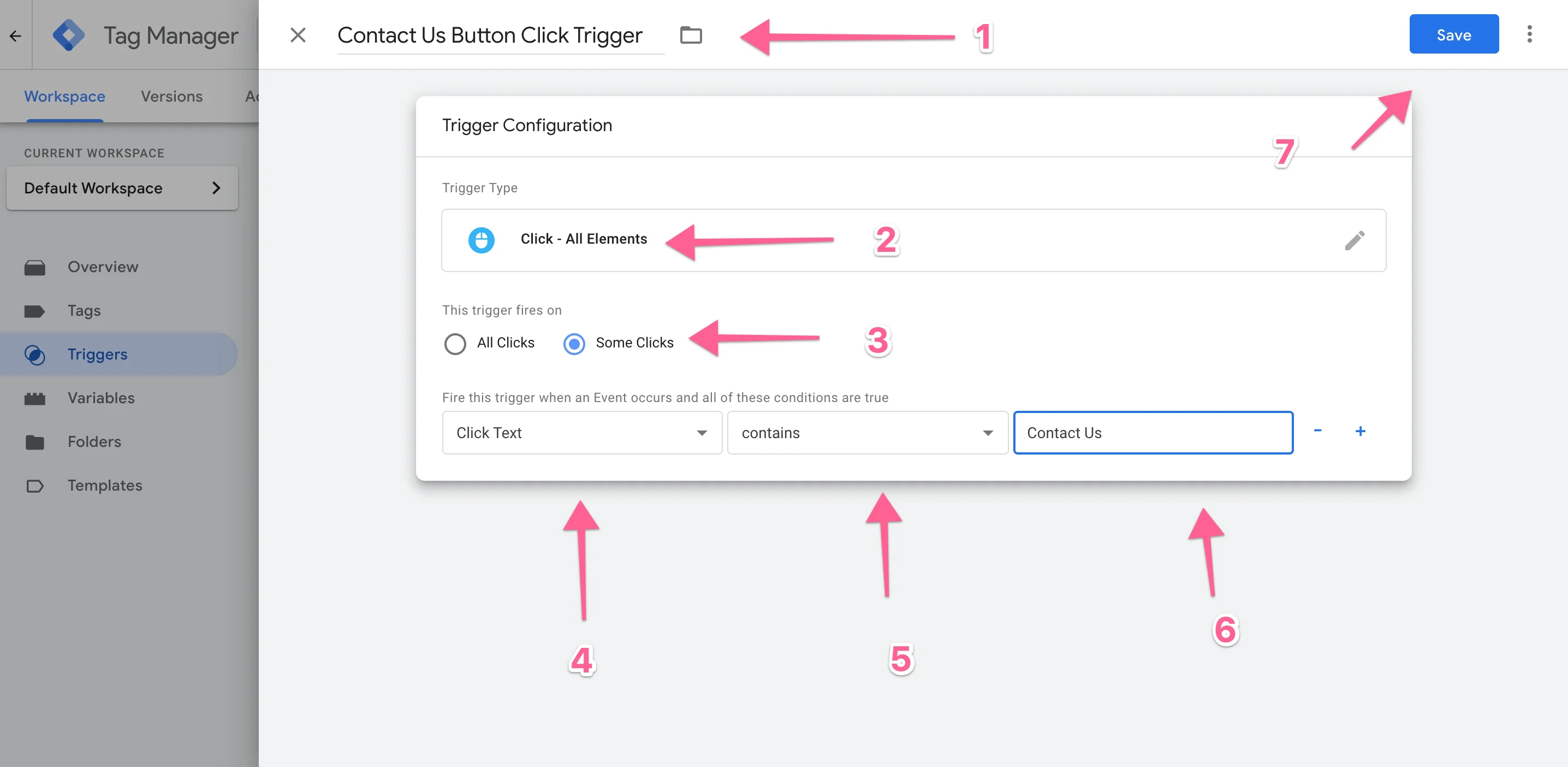
To make this work just Submit and Publish. It won't do anything but fire when you click. To create your event, go to the next how-to on creating the GA4 event.
But let's say you don't want to track using Click Text. You could use some of the other variables (we have a separate post for Form Submission tracking), go try them out, things like Click Classes etc. are fairly easy to use. But let's look at tracking specific link clicks.
Step 2: Tracking link clicks
Okay, so in our case we have just added a new portfolio item and we'd like to track how many folks clicked on the link to our client's site. We're going to set up a link click trigger.
Again, go to Triggers and hit New, give the Trigger a name, select Click - Just Links. We want this because it's a link in the copy of our portfolio post and we'd just like to track links to the client's site.
Select Some Link Clicks, then from the dropdown select Click URL, then Contains is fine and paste in the link you used on the site.
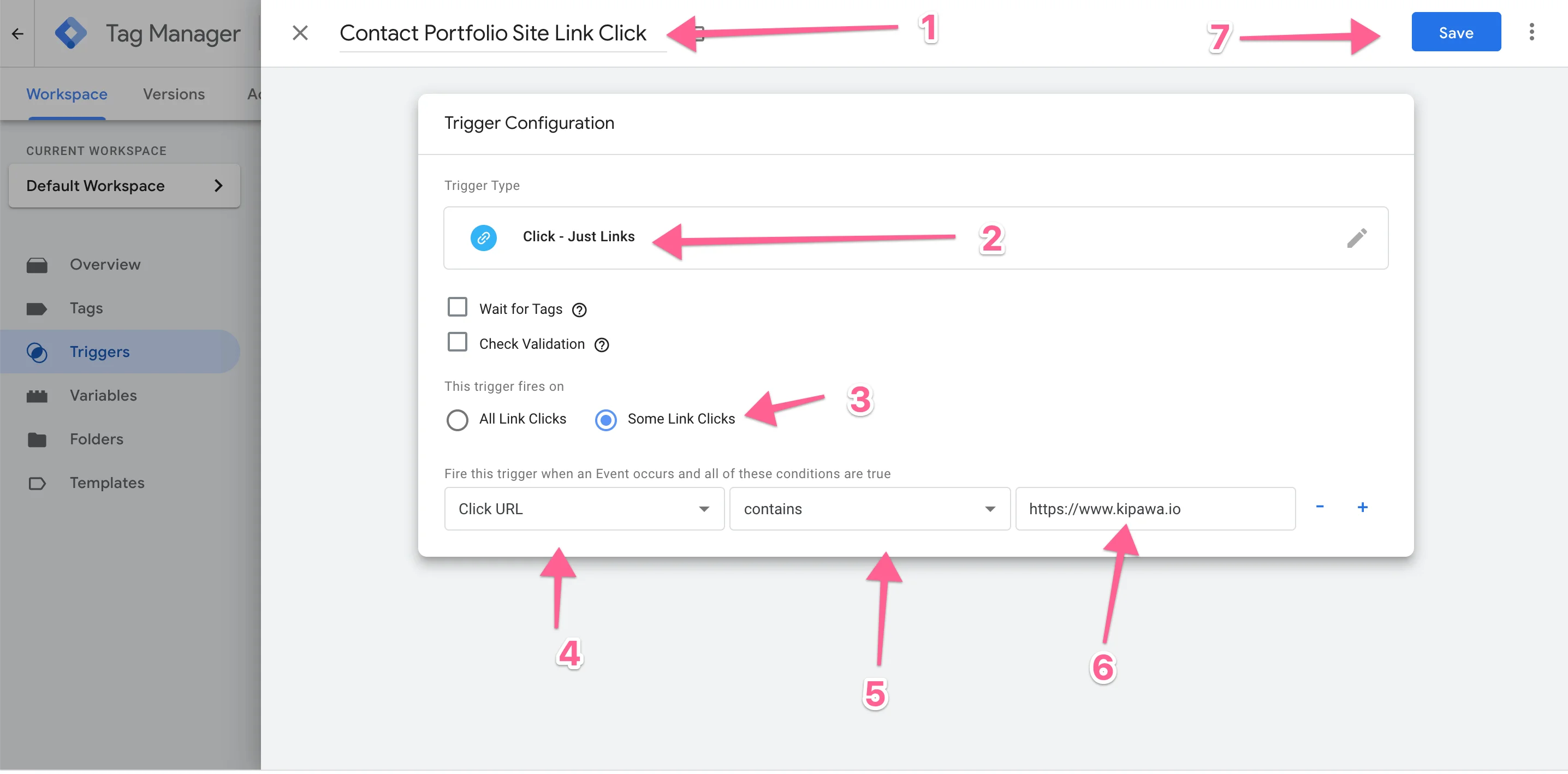
Save, Submit and Publish. You're done. To create the event and link the trigger, head to the GA4 event how-to.
Frequently asked questions
How do I track a button click in Google Analytics?
Create a click trigger in Google Tag Manager, then use it to fire a Google Analytics event. In Tag Manager, hit Triggers and then New, choose Click - All Elements, select Some Clicks, pick Click Text, Contains, and type the words on your button. Save, Submit and Publish, then link the trigger to a GA4 event tag.
How do I track link clicks with Tag Manager?
Use a Click - Just Links trigger instead. Select Some Link Clicks, choose Click URL, then Contains, and paste in the link you want to track. It's the neat way to count how many people click through to a client's site or any other outbound link.
Do I still need Universal Analytics for click tracking?
No. Google stopped processing standard Universal Analytics properties on 1 July 2023, so set up your click events in Google Analytics 4. The triggers in this post work the same way either way, and only the event tag differs.
Remember to always Submit and Publish, and if you have issues or questions hit us up in the comments. Once your clicks are coming through, you can also delay your Tag Manager triggers to keep page speed happy. But that's the long and short of how to track button clicks.